Selling your business

Be diligence-ready before the LOI is signed.

ClosingVault is a virtual data room for owners selling their business. Add documents in batches as you find them; it files each one against the checklist and shows what’s still missing, so the exclusivity period goes to closing, not to hunting for paperwork.

With a broker or on your own, for any lower-middle-market sale up to $50 million. Built only for M&A, with more features than $10,000 products.

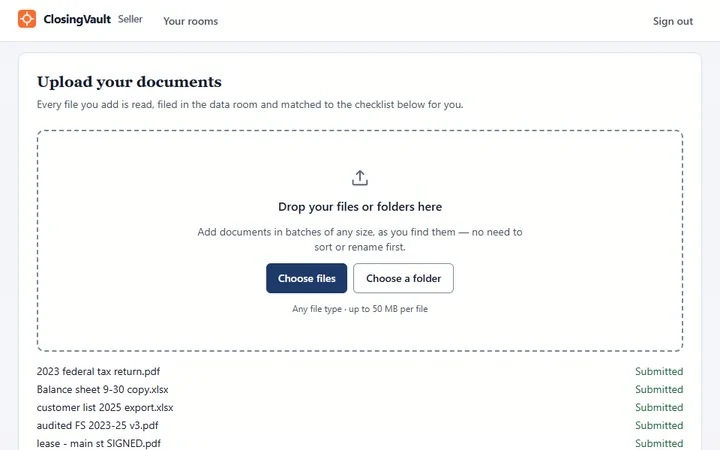
The seller’s upload page in ClosingVault: a drop zone for files or folders in batches of any size, and a just-added batch of files with names straight off a scanner or an export, each listed as Submitted.
File names as they came off the scanner. Nobody renamed them.

What you get out of it

A sale that moves at your pace, not the paperwork’s.

  1. A faster close.

    Your documents are organized and complete before a buyer signs the LOI, so the exclusivity clock isn’t spent hunting for paperwork.

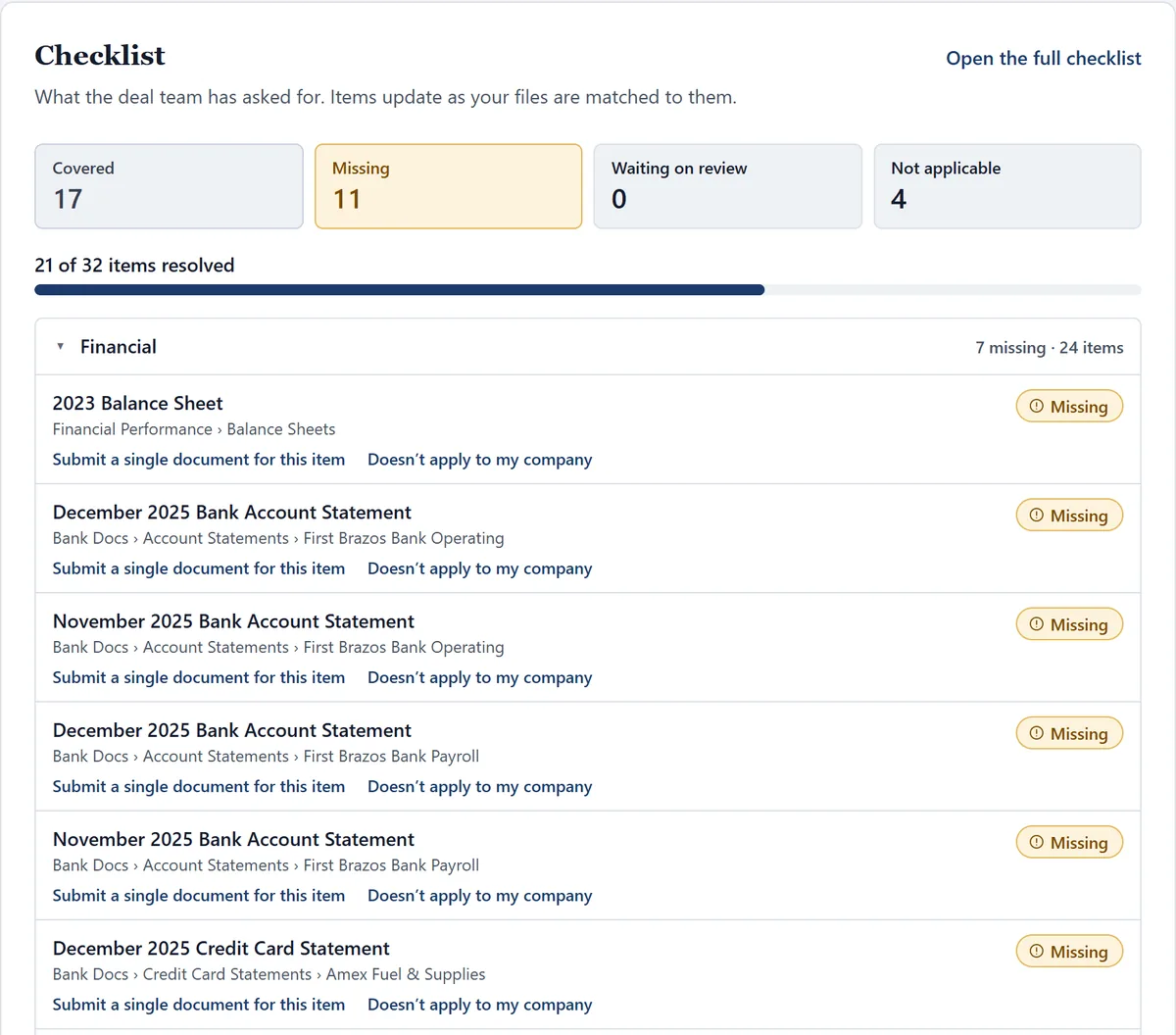
    How: the checklist shows what’s covered and what’s missing, missing first, and fills as each file is matched.

  2. Fewer surprises at the table.

    You see the gaps before a buyer does, and fix or explain them early. Less is left to reopen late in the deal, when it costs the most.

    How: every request stays open until it’s answered, so nothing slips through as silence.

  3. A stronger position with buyers.

    A complete, current room says the company is well run, and it lets serious buyers move quickly.

    How: a newer copy for the same period becomes the current version; identical files are skipped.

  4. The business keeps running.

    No renaming, no sorting. Add documents in batches of any size as you find them, and only handle what’s missing.

    How: each file is read, scans included, and filed by what’s on the page, not its name. Bank statements land under the right account.

The seller’s checklist in ClosingVault: counts of covered, missing, waiting on review and not applicable items, a progress bar of items resolved, and each phase with its start and due dates and the files that cover its items.
What’s left, at a glance, before anyone signs an LOI.

Control

You decide who sees what, and when.

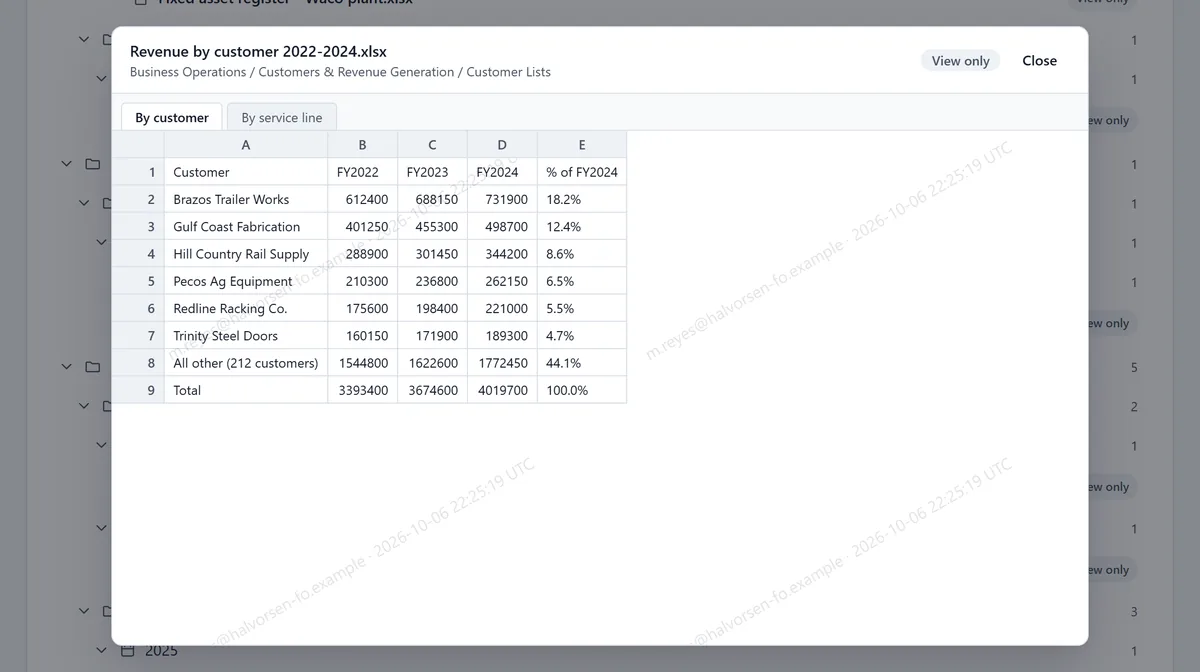
Each buyer sees only what’s released to them at their stage of the deal, and only the people you allow can download. Everyone else reads in a viewer stamped with their name and the time, with printing and copying suppressed.

A buyer viewing a customer revenue workbook in ClosingVault, marked View only, with a diagonal watermark of the buyer’s email address and the time across the grid.
A buyer’s view: watermarked with their own name, view only.
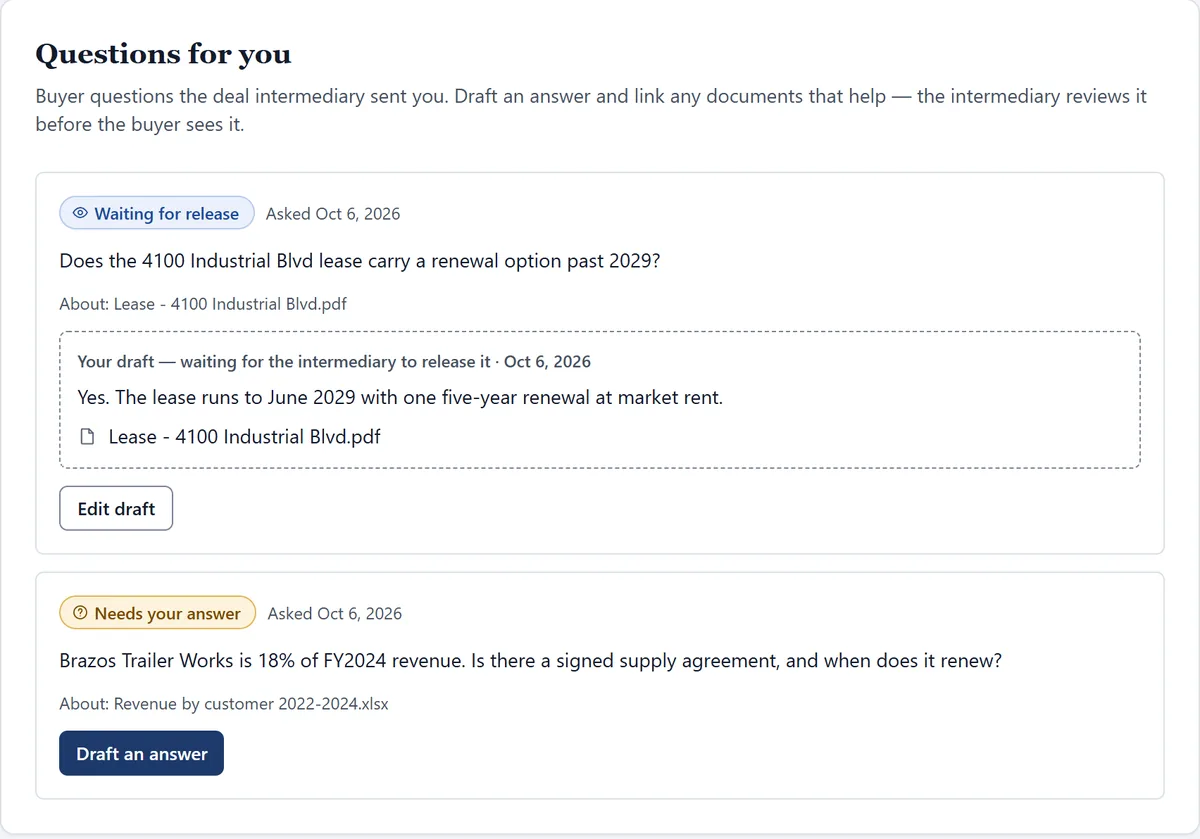
The seller’s Questions for you page: two buyer questions with no buyer named, one with the seller’s draft answer waiting to be released and one waiting for an answer.
Buyer questions reach you without the buyer’s name. Your answer goes out only when it’s released.

Phases with dates

The checklist reaches you in phases, each with a start and a due date, released when your room admin chooses. You see what is due, and when.

Sensitive numbers hidden

Account numbers on statements, account details on checks and deposit slips, and Social Security numbers are hidden before buyers see a document, with the last four kept on statements. Buyers get the redacted copy only.

Fix it yourself

You and your team can move a document to another folder, set its period and date, or link a document already in the room to a checklist item. Each change is on the record.

Uploads that explain themselves

Zips and saved emails are unpacked and exact duplicates skipped. A clearly newer copy becomes a new version; when it isn’t sure, it asks. A file that can’t be read is flagged and you are asked for a readable copy. Each upload ends with a summary. Decision-only AI: it files and finds, it never writes text, and there’s no chatbot to leak your documents.

Two ways to sell

With your broker, or on your own.

With a broker

Most owners sell this way. Your broker opens the room and pays for it.

  • You add documents; your broker sees the gaps the moment you do.
  • Buyer questions come to you without the buyer’s name. Answer once, and every buyer with access to the CIM can read it.
  • No LOI is accepted, countered or declined, and no exclusivity is set or extended, until the owners approve it by their share of the company.

On your own

Selling without a broker? Open the room yourself and run the sale from it.

  • Start from your buyer’s request list, or the ClosingVault checklist.
  • Invite each buyer and open the room to them stage by stage.
  • Buyers read and sign the NDA in the room before the CIM opens.
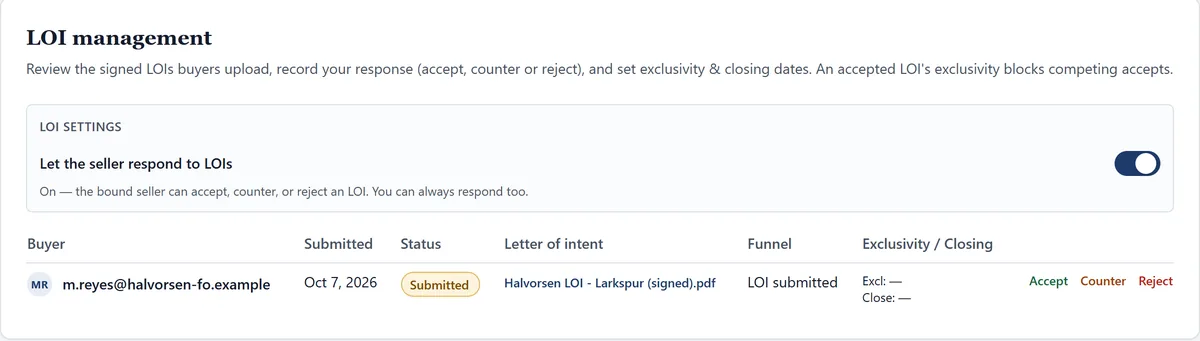
  • LOIs arrive as signed documents. Accept, counter or reject, and set the exclusivity clock.
  • See who is reading what, as plain counts.

How each buyer’s access works

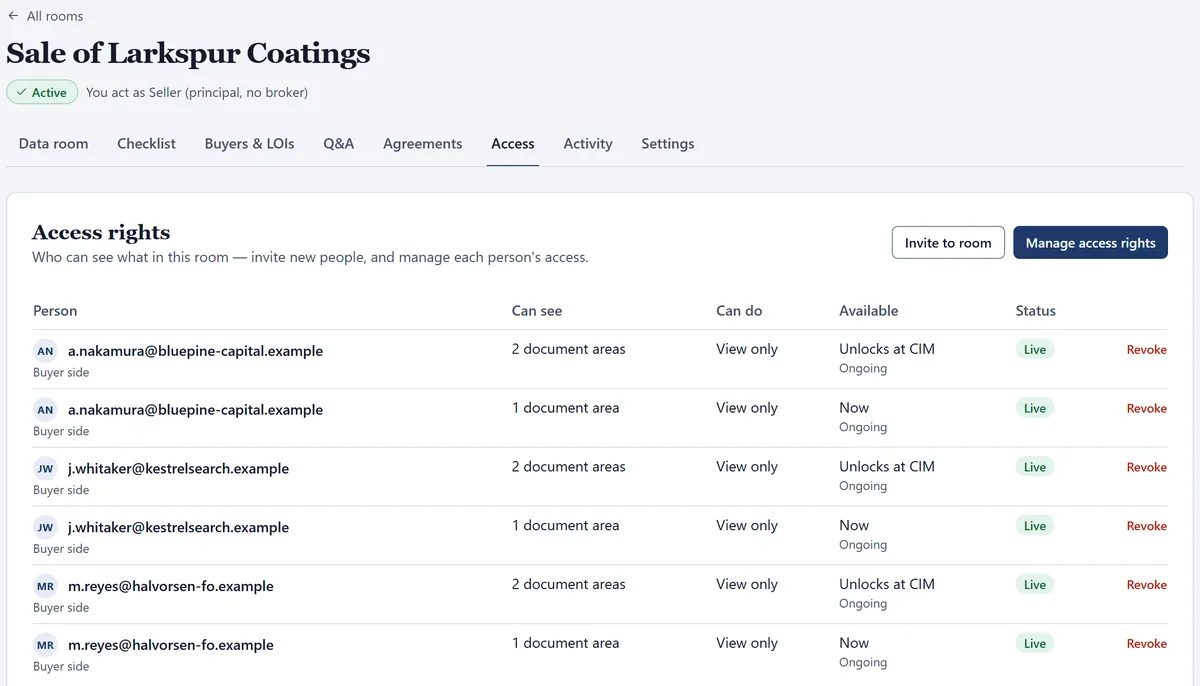
  • Each buyer sees one document area now, and more open at the CIM stage.
  • Every buyer’s access ends on a date: two weeks by default, two months at most.
  • Buyers are view only unless you allow downloads, person by person.
  • You can revoke anyone at any time, and their history stays on the record.
An owner-run room headed “You act as Seller (principal, no broker)”. The Owners panel shows the owner’s share of the company, and the Access rights list below shows each buyer with one document area visible now and one that opens at the CIM stage, all view only, each with an end date.
Letters of intent and the owners’ vote: an accepted LOI waiting for the owners, with 40% approved, 60% not yet voted, and Approve and Decline buttons, above the list of LOIs with their status and exclusivity.

Due diligence checklist for selling a business

What buyers will ask you for.

For a lower-middle-market sale, expect most of this. The room tracks each request until it’s answered. To lay your files out the way buyers expect, start from the free data room index template.

  • Tax returnsFederal and state, usually three years, plus payroll tax filings.
  • P&Ls and balance sheetsAnnual for three years, and monthly for the recent stretch.
  • Bank, card and loan statementsMonthly, for every account the company holds.
  • Customers and revenueRevenue by customer, customer contracts and pricing.
  • Property and equipmentLeases, the asset list, equipment leases and vehicles.
  • PeoplePayroll register, benefit plans, contractor agreements.
  • LegalFormation documents, permits, litigation, IP, environmental.
  • InsuranceEvery policy, plus loss runs for the last three years.

Selling with partners

Every owner has a say, in proportion.

Two founders, a family, an investor with a stake: enter each owner with their share of the company, and the big decisions follow that share.

Who decides on an LOI?
The owners, by ownership. An LOI is accepted, countered or declined only when owners holding more than half of the whole company approve. A 50/50 split never approves. A single owner with 100% decides in one click.
Can my broker decide alone?
No. When a broker accepts, counters, declines or extends exclusivity, it is a proposal until the owners’ majority approves it.
Does my team bind the sale?
Never. Your team works in the seller portal with your access: uploading, linking documents, certifying and answering questions under their own names. They can’t decide, vote, set exclusivity or change the owners. A team member tagged Legal can follow the LOIs and their outcomes. Everyone else on the team doesn’t see them.
What if something changes?
The room admin can add, re-weight or remove an owner at any time. Every owner is emailed when the list changes, with the owners’ new shares and who changed them.
Can I click through by accident?
Counters, declines and each owner’s vote ask “Are you sure?” first. Accepting an LOI opens the exclusivity terms, with a countdown once it is set.
What owners ask us

Last updated: 2026-11-03

Do I need to rename or sort my files first?

No. Add folders as they are, in batches of any size, any file type up to 50 MB a file. ClosingVault reads each file, scans included, and files it by topic and period.

Will every buyer see everything I upload?

No. Each buyer sees only the folders released to them at their stage of the deal, and only the people you allow can download. Everyone else reads in a watermarked viewer stamped with their name and the time. How deal documents leak, and what stops each leak.

I’m selling without a broker. Can I set up the room myself, and how long does it take?

Yes, in about 3 minutes with the standard defaults. Open the room yourself as the seller, invite each buyer, and run the NDA, the CIM, LOIs and diligence from one place.

What gets blacked out?

Account numbers on statements, account details on checks and deposit slips, and Social Security numbers are hidden before buyers see a document, with the last four kept on statements. Buyers get the redacted copy only.

There are three of us who own the company. Who decides on an LOI?

The owners, by ownership. An LOI is accepted, countered or declined only when owners holding more than half of the company approve, and every decision asks “Are you sure?” before it goes through. Your team never binds the sale.

My accountant already keeps our books in a Google Drive folder. Can buyers just look there?

They can, but a Drive folder leaves the files in a general-purpose drive with its own sharing, sync and account controls: anyone with Drive access or a forwarded link can get around the “room”, and one compromised Google account or OAuth grant exposes everything. In ClosingVault each document is encrypted with AES-256-GCM under its own key, Social Security and account numbers are removed automatically, and every buyer’s access ends on a date. Here is the full data room vs Google Drive comparison.

We might raise money instead of selling. Can I use ClosingVault as a fundraising data room?

No. ClosingVault is built only for lower-middle-market M&A: the sale of a company, teaser to close. A fundraising data room or a board portal is not us; here is what a lower-middle-market data room covers.

Will ClosingVault tell me what my business is worth, or flag problems before buyers see them?

No. ClosingVault’s AI organizes, never opines: it files and finds your documents, and the valuation and analysis stay with you and your advisors. You can’t see what a data room’s own analysis rests on (the model, the assumptions, the period, the outcome it optimizes for), so trusting it means betting millions that the vendor got it right.

My business should sell for about $40 million. Is that too big for ClosingVault?

No. ClosingVault is fully customizable for any lower-middle-market deal up to $50 million, with the same AI filing, automatic redaction, owner voting and exclusivity on every plan.

Do I have to pay for ClosingVault?

The firm that opens the room pays. If your broker opened it, they pay, and you, your co-owners and your team are always free and unlimited. If you run the sale yourself, you start with 30 days free on one active deal room, with unlimited documents, 10 Ask the Data Room questions a day and the full ClosingVault checklist to work in the room; downloading a checklist comes with Plus and Professional.

Get the room ready before the buyer is.

Ask your broker to open a room, which costs you nothing, or start your own 30-day free trial: one active room, the full ClosingVault checklist, no credit card. Questions? Leave your email.

Start free trial

We use your email to reply to you and add you to our contact list. Privacy Policy