The diligence project manager for brokers and M&A advisors

Four live deals. None of them need a filing clerk.

Your seller adds documents in batches, as they turn up. ClosingVault files each one against your diligence checklist, puts every bank statement under its own account, and shows what’s still missing. You run the buyers.

Every live deal on one page, the one with the most still missing first. Click a deal’s missing count to see exactly which documents are still due.
The Buyer pipeline for Project Larkspur, furthest along first. Each buyer has a stage bar running Teaser, NDA, CIM, LOI, DD, Exclusivity, Close. Harbor Ridge Capital is at stage 6 of 7, exclusive until Nov 30, 2026. Cedar Point Partners has submitted an LOI that is awaiting your response. Northwind Capital's LOI is countered. Tallgrass Partners is reading the CIM, and Oakmont Group has the teaser only, with no activity yet.
Every buyer’s stage, teaser to closing: who is exclusive and until when, and which LOI is waiting on you.

Your week, job by job

The five jobs that eat a sell-side week.

Shown on Project Larkspur, an invented deal with three invented buyers. The screens are the real product.

Chasing documents

The checklist fills itself. You chase the gaps.

Each document is matched to the request it answers, and every item stays open until it’s answered. You chase only what’s missing.

Give any item a deadline and overdue items are flagged. Release the checklist by phase, today or on a set date. The seller works from the same list.
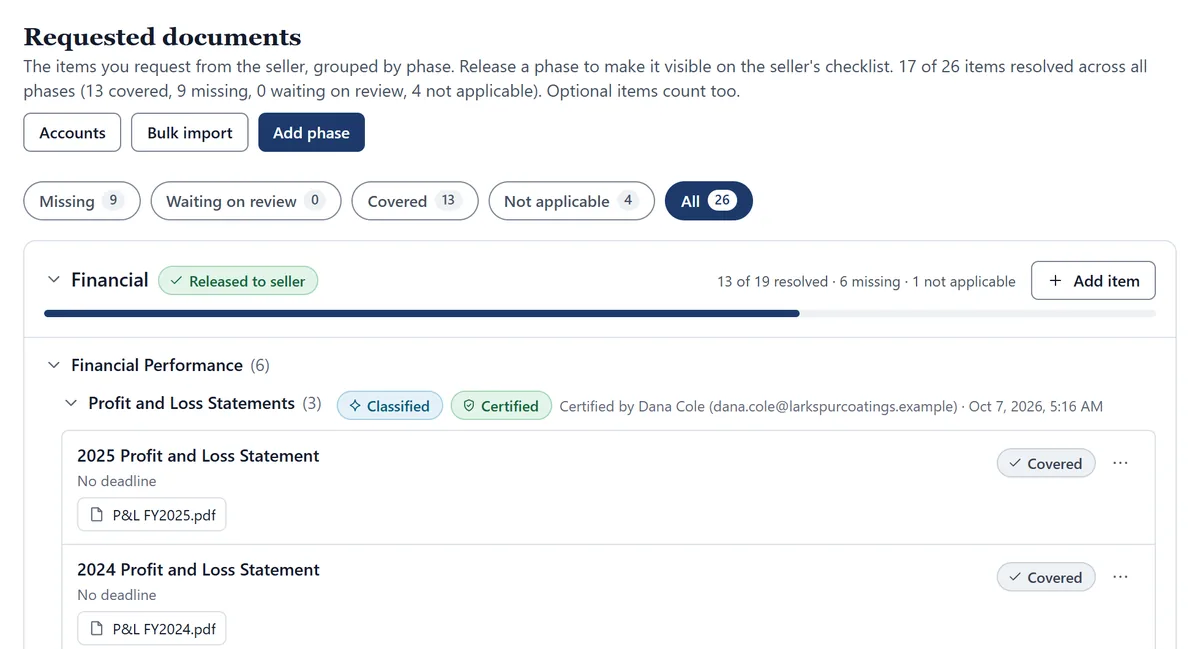
The intermediary’s Requested documents page: 17 of 26 items resolved, filters for missing, waiting on review, covered and not applicable, and the Financial phase released to the seller, with profit and loss statements covered and the section marked Classified and Certified.

Buyer questions

Answer it, or send it to the seller. Nothing leaves without you.

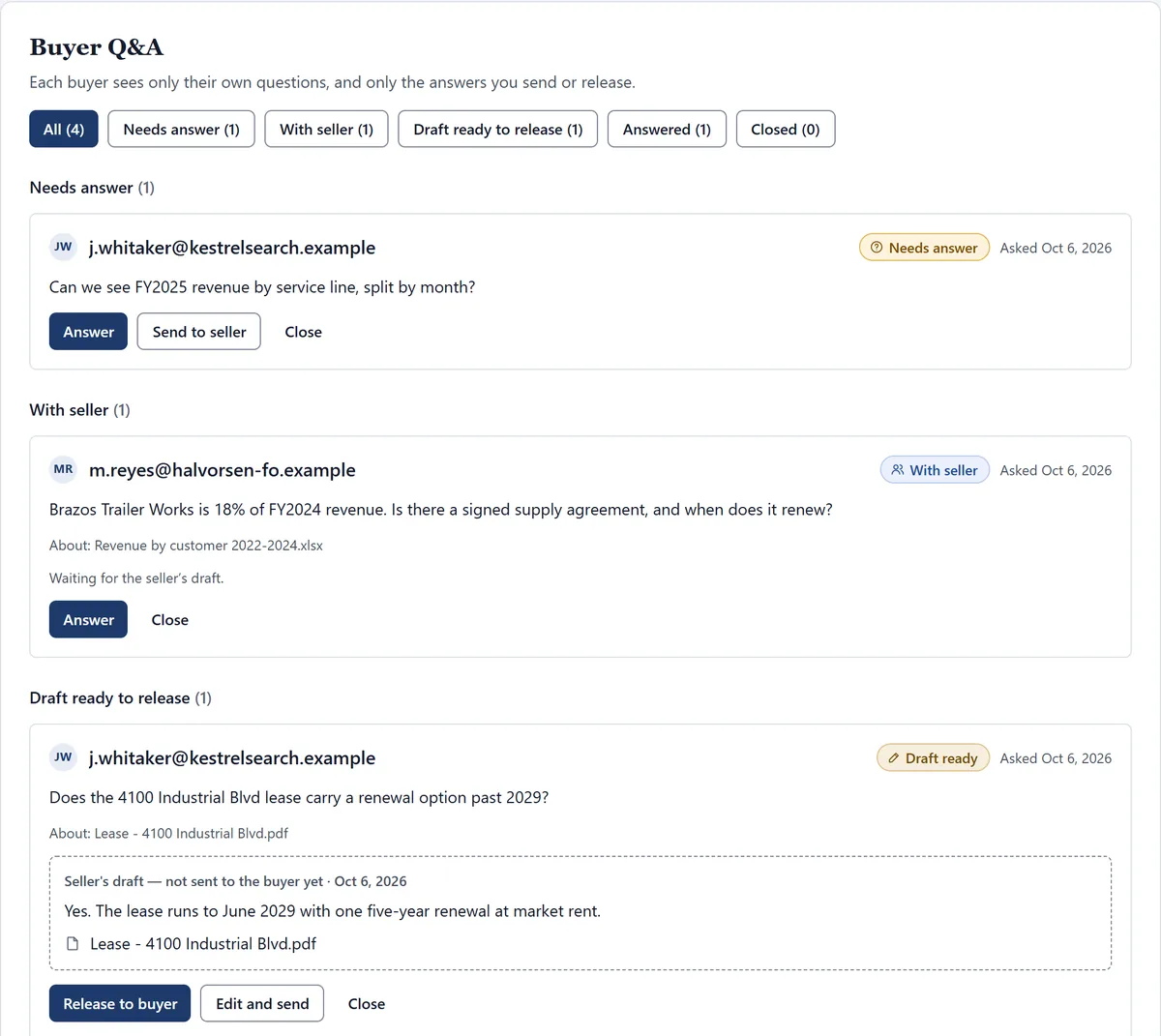
A buyer asks about a file or about anything at all. Answer with the document linked, or route the question to the seller. The seller drafts; the buyer sees it only after you release it.

Answer once for everyone: publish an answered question to the shared Buyer Questions area, and every buyer with access to the CIM reads it, with the asker never named. An answer can only link files that buyer is allowed to see.

The intermediary's Buyer Q&A queue, filtered into Needs answer, With seller, Draft ready to release and Answered. One buyer's question about a facility lease shows the seller's draft answer with the lease linked, not yet sent, with a Release to buyer button.

Buyer interest

Who’s actually reading. Facts, not scores.

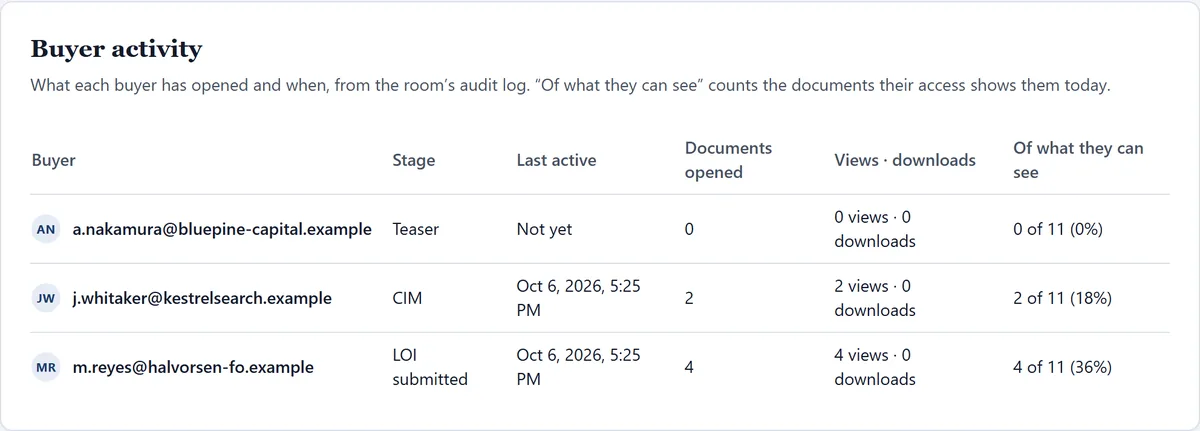
Stage, last active, documents opened, views and downloads, and how much of what each buyer can see they’ve opened. Straight from the audit log.

Revoke a buyer and their history stays on the record.

The Buyer activity table for three buyers: one at Teaser who has opened nothing, one at CIM with 2 of 12 visible documents opened, and one at LOI submitted with 4 of 12 opened, each with last-active time and views and downloads.

Access

Open the room one stage, one buyer, at a time.

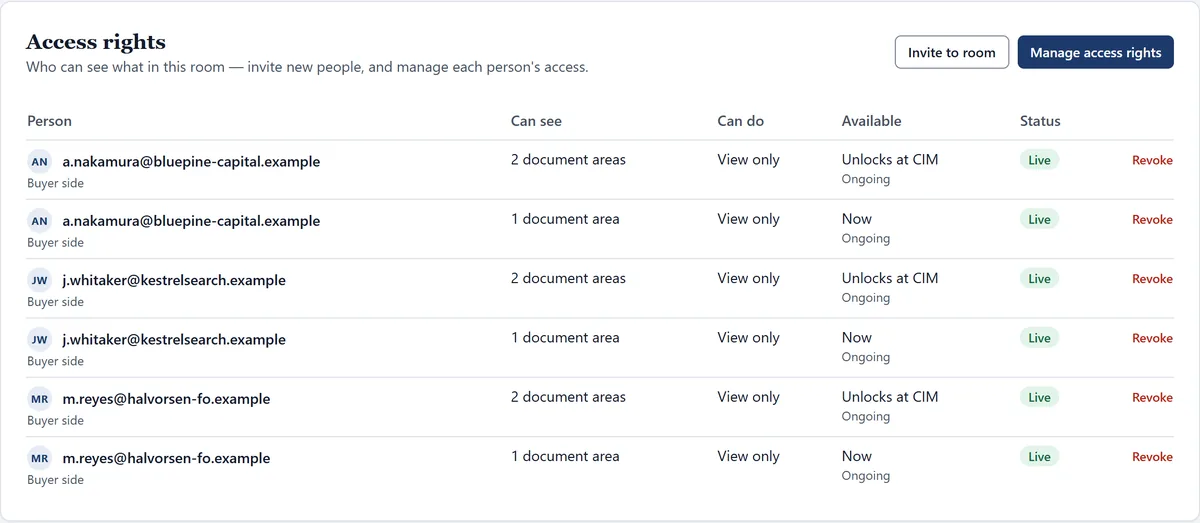
Signing the NDA opens the CIM. A submitted LOI opens diligence. You decide who may download; everyone else reads in a viewer stamped with their name and the time, with printing and copying suppressed.

Hide any single document from buyers, or from the seller, in one click.

Access rights for three buyers: each can see one document area now and two more that open at the CIM stage, all view only, with a Revoke link per grant.
Each buyer’s access opens stage by stage.

Exclusivity

Exclusivity your client signed off on, on the record.

Accept an LOI and set when exclusivity starts and how long it runs. Your seller validates it, and every extension, so the client’s agreement to the dates is documented, not remembered.

Backup buyers stay informed and on the hook. They’re told an LOI has been tentatively accepted, their access pauses rather than ends, and it comes back on its own if the deal washes out. A countdown keeps you and your seller on the same date.

On the record for every accepted LOI

  • The signed LOI and your acceptance
  • The exclusivity start date and length
  • Your seller’s validation
  • Every extension, and who approved it

A defensible record

Proof you ran a clean process.

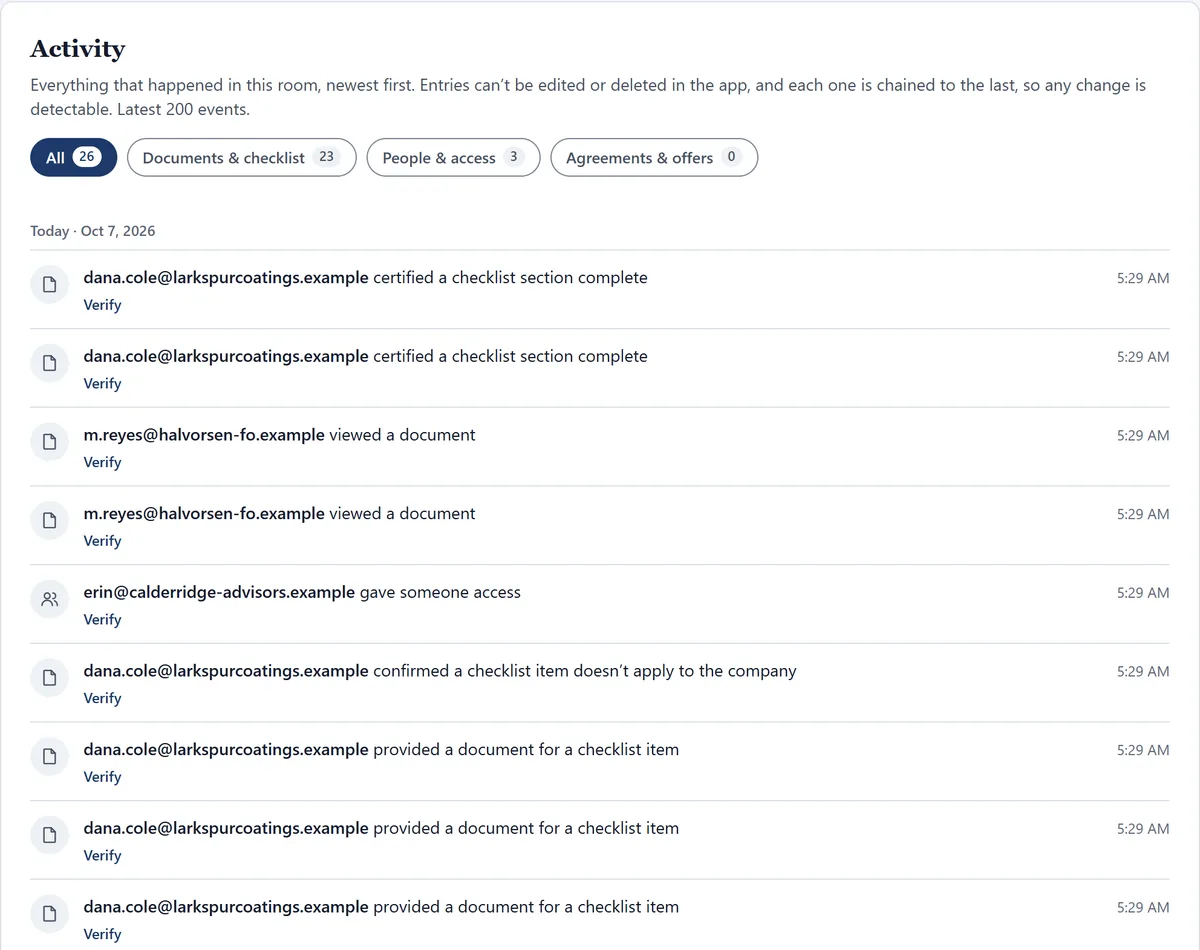
If a buyer later says something was withheld, or a deal is challenged, the room shows what happened. The seller’s own certifications are on the record, not your word. The log is tamper-evident and hash-chained: entries can’t be edited or deleted in the app, and each is chained to the last.

  • What was requested. Every item on the checklist, and when.
  • What the seller provided, and when. Every upload, the request it answered, and each newer version.
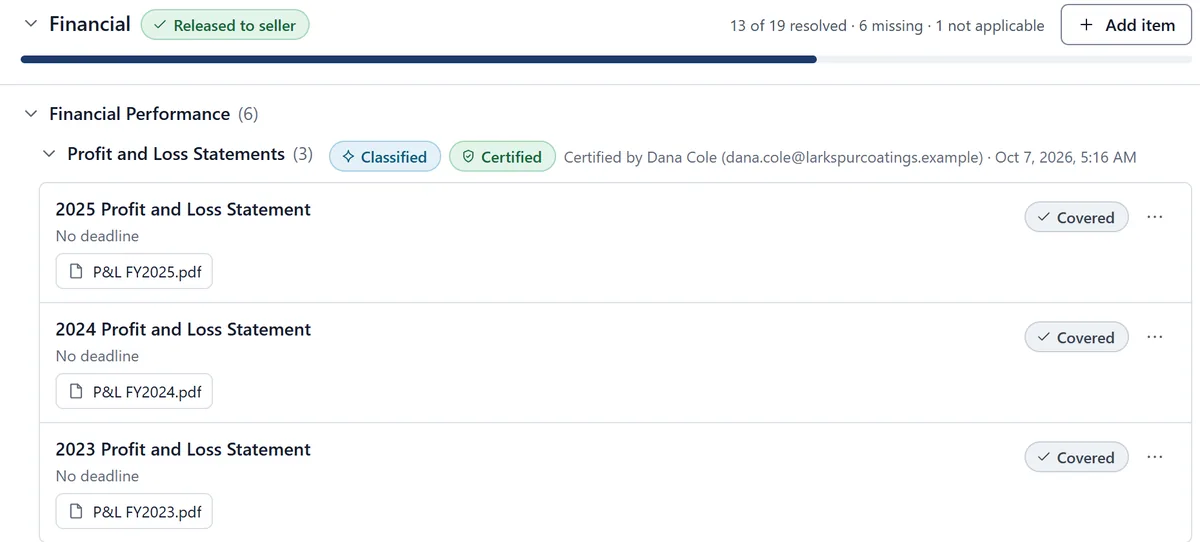
  • What the seller certified. Sections marked Classified by the AI and Certified complete by the seller, with their name and the time. Items the seller signed as not applicable, in their words.
  • Who viewed what. Every buyer’s opens and downloads, document by document.
A checklist section, Profit and Loss Statements, with two marks: Classified and Certified, and the line “Certified by Dana Cole” with the seller’s email and the time. Its three items are Covered, each with the file attached.
The room’s Activity log, newest first: the seller certified two checklist sections complete, a buyer viewed documents, the seller confirmed an item doesn’t apply to the company and provided documents for checklist items, each entry with the time and a Verify link.

Pricing

The deal math for your firm.

30 days
Free on one deal room with your own checklist. We give you a sample layout and walk you through it.
25 firms
Get founding pricing, kept as long as they stay subscribed without a billing gap.
1 bill
The firm that opens the room pays. Buyers and sellers you invite don’t. Paid plans include the full ClosingVault checklist.

What brokers ask first

How is this different from a traditional virtual data room?

A traditional data room stores files where someone puts them. ClosingVault works as your automated due diligence project manager: it tracks every item on the request list and its deadline, files and matches each document as it arrives, shows what’s still due, routes buyer questions to the seller and back, and keeps a tamper-evident record of all of it.

Does the AI file documents without anyone checking?

It files what it is confident about and puts the rest in a one-click review queue. Every decision your team makes there improves how it files similar documents, and that learning stays with your firm.

Who can download our documents?

Only the people you allow, person by person. Everyone else reads in a viewer stamped with their name and the time, with printing and copying suppressed.

What does it cost?

The firm that opens the room pays. You get 30 days free on one deal room with your own checklist; paid plans include the full ClosingVault checklist. The first 25 firms keep founding pricing for as long as they stay subscribed without a gap.

Open your next listing with the checklist already working.

30 days free with your own checklist. Founding pricing for the first 25 firms, kept as long as you stay subscribed without a gap.

We will only use your email to contact you about early access.