For business brokers and M&A advisors
You’re a broker, not your seller’s filing clerk.
ClosingVault gets the documents out of your seller and into a finished data room without you sorting a single file. The seller and their team drop in whatever they have, phone photos and scans included; each file is read, filed to the checklist item it answers, and the checklist shows what is still missing. You chase only the gaps.
Built only for lower-middle-market M&A, for deals up to $50 million.
Last updated: 2026-11-05
Why does collecting seller documents stall so many deals?
Because the owner selling the company is still running it, so documents arrive late, in piles and in whatever form was handy: an email attachment here, a phone photo of a lease there, the same bank statement sent three times. Somebody has to sort it, rename it, tick it off a spreadsheet and chase what is missing, and on most deals that somebody is the broker.
- You become the filing clerk. Hours go to saving attachments, renaming Scan_0417.pdf and dragging files into folders, and nobody pays you for any of it.
- The request list lives in a spreadsheet. It is out of date the moment the next email lands, so nobody is sure what is still missing.
- Status lives in phone calls. The seller asks what you still need, the buyer asks when it is coming, and you answer both from memory.
- Buyers wait, and deals cool. Every week spent chasing paperwork is a week for a buyer to lose interest, retrade or walk.
The seller uploads. The room sorts, files, tracks and reports. You chase only what’s missing.
How does ClosingVault get documents from the seller into the data room?
In seven steps, and only the first three are yours: open the room, release the first requests, invite the seller. After that the room reads, files, tracks and reports every document, and asks a person only when it isn’t sure.
- Open the room from a checklist. A room with the standard defaults is set up in about 3 minutes. Every plan includes our standard due-diligence checklist, Plus and Professional include the ClosingVault checklist, and any room can start from your own Excel request list.
- Release the first phase to the seller. Split the checklist into phases, each with a start and a due date, and release each one to the seller today or on a date you set. Give any item a deadline and overdue items are flagged. Nothing reaches the seller until you release it.
- Invite the owners and the seller’s team. Add each owner, and the people who actually gather the paperwork, such as the bookkeeper or the office manager, as the seller’s team. Everyone signs in with a one-time code sent by email, and the seller’s team works in the seller portal with the seller but never binds the sale.
- The seller drops in whatever they have. Files or whole folders, in batches of any size, whenever they turn up: any file type, up to 50 MB a file. Zips and saved emails are unpacked, and scanned PDFs and phone photos, iPhone HEIC files included, are read with OCR on ClosingVault’s own servers. Nobody sorts or renames anything first.
- Each file is filed and ticks its checklist item. Each document is filed by what is on the page, not its file name, and lands on the checklist item it answers, marking it Covered. Bank statements go under each institution and account, by year and month; tax forms are recognised by the form printed on them; formation documents go under the item for the company’s state. What the AI isn’t confident about waits in a one-click review queue for your team.
- Repeats are skipped and unreadable files go back. A byte-identical re-upload is skipped, and the uploader is told it was already in the room. A clearly newer copy for the same period becomes the current version; when it isn’t sure, it asks. A locked, damaged or blank file is flagged, and the seller is asked for a readable copy.
- Everyone sees what is still missing. The checklist shows what is covered and what is missing, missing first, and an item closes only with a document or the seller’s signed statement that it doesn’t apply. Every Monday at 8 a.m., you, your deal team and each seller get a one-page update on what came in and what is still missing.
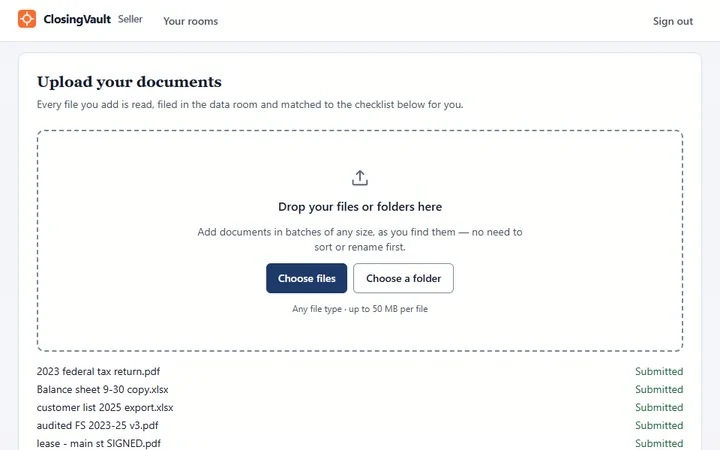
What does the seller see when they sign in?
One drop zone and the same checklist you see, limited to the phases you have released. The seller’s dashboard lists what is still missing and overdue or due within 7 days, and a short guide walks them through dropping in documents, seeing what is missing, finding and fixing a document and answering buyer questions.
Nothing on the seller’s side needs a filing system. Each upload ends with a summary of what was added, skipped or failed, so the seller knows it landed without calling you to ask. The firm that opens the room pays; invited buyers, sellers, owners and their teams are always free and unlimited.
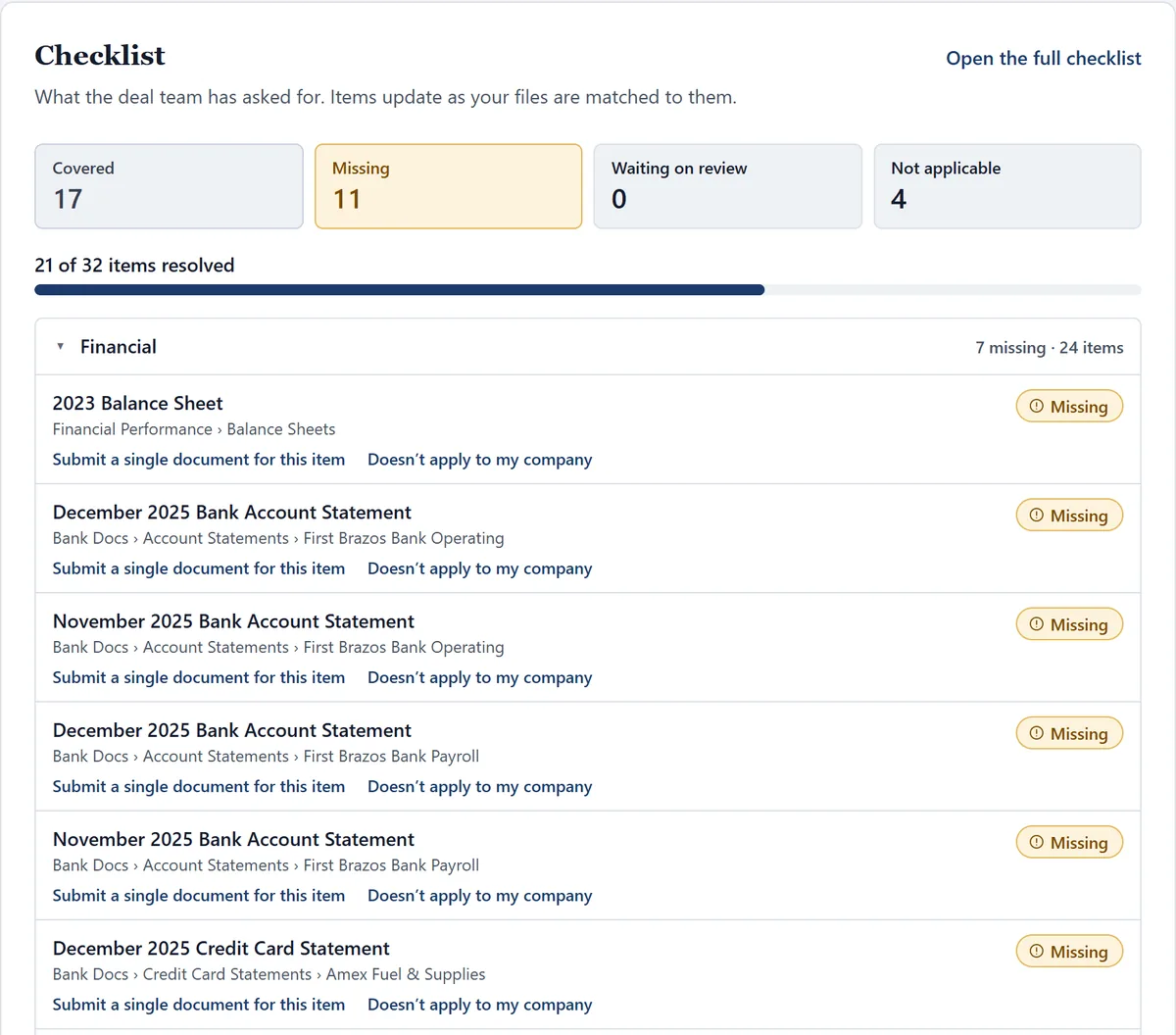
What happens when the seller sends the same file three times, or one nobody can read?
The repeats are skipped and the unreadable file goes back to the seller with a plain request. A byte-identical re-upload never becomes a second copy: it is skipped, and the uploader is told it was already in the room.
- Newer versions. A clearly newer copy for the same period becomes the current version; when ClosingVault isn’t sure, it asks.
- Unreadable files. A locked PDF, a damaged file or a blank scan is flagged with what is wrong, and the seller sends a readable copy as a new version of the same document.
- Things that don’t exist. An item closes only with a document or the seller’s signed statement that it doesn’t apply, with their name, the time and their exact words. Nothing closes on silence.
Are account numbers and Social Security numbers hidden before buyers see a file?
Yes, automatically. Account numbers on bank, card and loan statements, account details on checks and deposit slips, and Social Security numbers are hidden by ClosingVault’s own rules, not by AI, with the last four digits kept on statements.
Everyone in the room sees the same redacted copy, and a buyer sees “Being prepared” until it is ready. Files it can’t safely handle are held for you to review. More on how automatic redaction works.
How do I know where every listing stands without calling the seller?
Open the Rooms page. Every live deal room is on one page, the one with the most still missing first, with its items resolved, covered by a document, marked doesn’t apply by the seller and still missing.
Every Monday at 8 a.m., the broker, the deal team and each seller get their own one-page update from the room: what came in, what is still missing and the dates to closing. The seller’s edition shows what is still needed from them, so the calls are about the gaps, not the status. See the Monday update and every live deal on one page.
When do buyers see the documents?
Only when you open the room to them, buyer by buyer and stage by stage. Signing the NDA opens the CIM and a submitted LOI opens diligence, and every buyer’s access ends on a date: two weeks by default, two months at most.
You decide who may download; everyone else reads in a viewer stamped with their name and the time. Between Mondays, buyers are told once a day at most when new documents open to them. More on stage-by-stage buyer access.
What brokers ask about collecting seller documents
I’m a business broker and my sellers send everything as phone photos and email
attachments. Will ClosingVault file them?
Yes. Phone photos, iPhone HEIC files included, and scanned PDFs are read with OCR on ClosingVault’s own servers and filed by what is on the page, not the file name. Saved emails and zips are unpacked, and a file that can’t be read is flagged and the seller is asked for a readable copy.
My seller’s bookkeeper does most of the gathering. Can she upload instead of the
owner?
Yes. Invite her as the seller’s team: she works in the seller portal with the seller, uploading and answering the checklist, and never binds the sale. The firm that opens the room pays; invited buyers, sellers, owners and their teams are always free and unlimited.
I have four live listings. How do I see what each seller still owes me without
calling them?
Open the Rooms page: every live deal room is on one page, the one with the most still missing first, with its items resolved, covered, marked not applicable and still missing. Inside each room the checklist lists what is missing first.
My seller keeps uploading the same bank statements. Will buyers end up with three
copies?
No. A byte-identical re-upload is skipped and the uploader is told it was already in the room. A clearly newer copy for the same period becomes the current version, and when ClosingVault isn’t sure, it asks.
Can I ask my seller for the financials first and hold the legal requests back
until later?
Yes. Split the checklist into phases, each with a start and a due date, and release each one to the seller today or on a date you set. Nothing reaches the seller until you release it.
I spend Friday afternoons writing status emails to my sellers. Can ClosingVault do
that?
Yes. Every Monday at 8 a.m., the broker, the deal team and each seller get their own one-page update from the room: what came in, what is still missing and the dates to closing. The room admin can change the day, and nobody writes a word.
How long does it take to set up a room for a new listing?
About 3 minutes with the standard defaults. Start from our standard due-diligence checklist, included on every plan, or upload your own request list as an Excel workbook; Plus and Professional also include the ClosingVault checklist.
Hand the filing to the room on your next listing.
Start your 30-day free trial: 1 active deal room, up to 250 documents and our standard checklist, no credit card. The firm that opens the room pays; invited buyers, sellers, owners and their teams are always free and unlimited.
Start free trial