Feature: automatic sorting
Drop the whole zip. Every file sorts itself.
ClosingVault reads every file a seller drops in, scanned pages included, unpacks zips and saved emails, skips exact duplicates and files each document to the right folder and period. Nobody sorts or renames a thing, and every upload ends with a summary of what was added, skipped or failed.
Last updated: 2026-11-03
What does automatic sorting do?
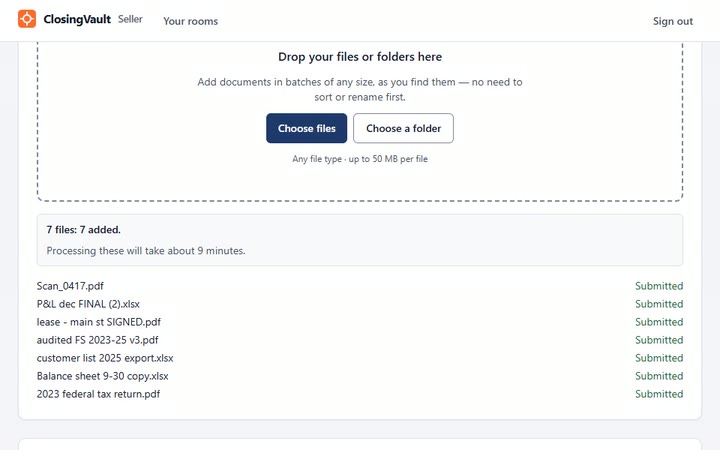
It takes the seller’s documents as they come, in batches of any size, and puts each one where it belongs: the right folder, the right period and date. A name like Scan_0417.pdf doesn’t matter, because each file is filed by what is on the page, not by its name.
How does it work, step by step?
- Drop in anything. Files or folders, ten or a thousand, whenever they’re ready: any file type, up to 50 MB a file.
- Unpacked. Zips and saved emails are unpacked.
- Read. Scanned PDFs and images are read with OCR on ClosingVault’s own servers, not sent to an outside OCR service.
- Duplicates skipped. Exact duplicates are skipped. A clearly newer copy for the same period becomes the current version; when it isn’t sure, it asks.
- Filed. Formation documents go under the item for the company’s state, tax forms are recognised by the form printed on them, and bank statements go under each institution and account, by year and month.
- Unsure? A person decides. What the AI is confident about is filed; the rest waits in a one-click review queue for your team.
- Summarized. Each upload ends with a summary of what was added, skipped or failed. A file that can’t be read is flagged, and the seller is asked for a readable copy.
Why does it matter in a lower-middle-market deal?
The owner selling the company is still running it, so documents arrive as they are found: phone scans, exports named FINAL (2), the same statement sent three times. Sorting that by hand is the part of a deal nobody wants. In ClosingVault the seller adds documents in batches as they turn up, and the broker sees the gaps the moment they do. One seller’s 2,400 files became 760.
Every filed document also lands on the checklist item it answers: see the checklist fill itself.
How is it different from other data rooms?
Most rooms keep a file where you put it. Of the seven low-cost rooms on our comparison, checked on their own sites on 2026-11-03, DocSend’s AI Organize suggests folders from file names and metadata, Ansarada’s AI sorts uploads into categories and Peony lists auto-indexing. None of the seven states reading scanned pages, filing bank statements by bank, account and month, or skipping an identical re-upload and telling the uploader.
Thinking of a shared drive instead? A data room next to Google Drive.
Automatic sorting questions
I’m a business broker with four live listings and sellers who send everything as
phone photos. Will ClosingVault file them?
Yes. Scanned PDFs and images are read with OCR on ClosingVault’s own servers and filed by what is on the page, not the file name. A file that can’t be read is flagged and the seller is asked for a readable copy.
I’m selling my company and my bookkeeper sent one huge zip. Do I have to unzip and
rename it first?
No. Drop the zip in as it is: zips and saved emails are unpacked, and each file is filed by topic and period. Nobody sorts or renames a thing.
My seller uploaded the same bank statements three times. Will the buyer see three
copies?
No. Exact duplicates are skipped, and the upload summary says what was skipped. A clearly newer copy for the same period becomes the current version.
What happens when the AI can’t tell what a document is?
It waits for a person. ClosingVault files what it is confident about and puts the rest in a one-click review queue, and every correction your team makes improves how it files similar documents; that learning stays with your firm.
Which files can a seller upload?
Any file type, up to 50 MB a file, in batches of any size. Zips and saved emails are unpacked and scanned pages are read.
How long does a 500-document upload take to sort?
On Starter and Plus it usually takes 20–60 minutes, and up to a few hours on a busy day. On Professional it is fully processed in about 35 minutes, even on a busy day; both are estimates for about 10 pages per document.