Feature: bring your own checklist
Bring your own checklist. It still files itself.
Upload your due diligence request list as an Excel workbook when you open the room. Its phases, categories and items become the room’s checklist, every document the seller adds is filed against it, and Professional can save it to start your next deal from the same list.
Last updated: 2026-11-03
What does bringing your own checklist do?
It lets the room run on the list you already trust instead of a vendor’s folder tree. Your spreadsheet’s phases, categories and items become the room’s checklist, and from then on every document is filed against your items and ticks them as it lands.
How does it work, step by step?
- Open a room. Choose to start from your own spreadsheet instead of ours.
- Upload the workbook. Its phases, categories and items become the room’s checklist. The app offers a sample layout to download, and our free checklist uses the same layout.
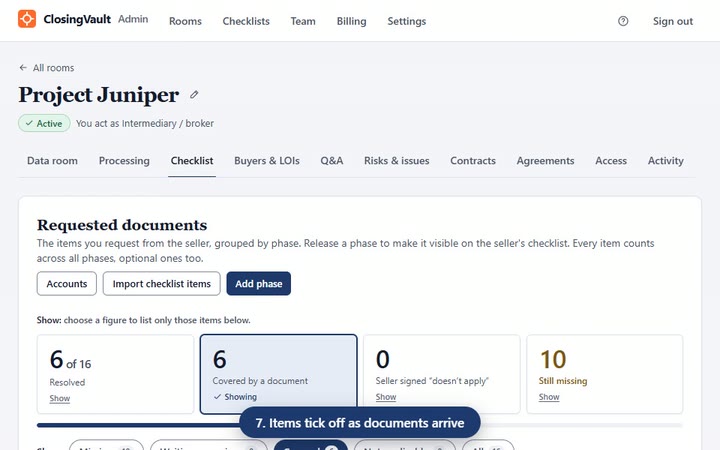
- Grow it as the deal does. The Requested documents page has Import checklist items and Add phase buttons.
- Release by phase. Each phase has a start and a due date, and reaches the seller today or on a date you set.
- Watch it fill. The seller adds documents; each is filed to the item it answers.
- Reuse it. Professional saves checklists you can reuse on every deal.
Why does it matter in a lower-middle-market deal?
The buyer’s request list belongs to the buyer. A search funder on a first acquisition, or an independent sponsor with a lender waiting on the QoE, wants that list answered, not a generic one. Bringing it into the room means the seller works from the same list the buyer sent, and nobody retypes it into folders.
How is it different from other data rooms?
On the vendors’ own sites, checked 2026-11-03: DocSend imports diligence-tracker tasks from its own CSV template on its Advanced Data Rooms plan ($180 a month billed yearly); Ansarada states Excel checklist import without saying which plan has it; and Papermark’s request list has an Import option with no file format stated. The difference in ClosingVault is what happens next: every document files itself to your items. See the full comparison.
Bring your own checklist questions
I’m a search funder with my own 200-line diligence list in Excel. Can I use it
instead of yours?
Yes. Upload it as an Excel workbook when you open the room; its phases, categories and items become the room’s checklist, and every document the seller adds is filed against it.
I run every deal from the same request list. Do I have to upload it each time?
Not on Professional, which saves checklists you can reuse on every deal. On Starter and Plus you upload the workbook when you open each room.
Can I add items after the room is open?
Yes. The Requested documents page has Import checklist items and Add phase buttons, so the list can grow as the deal does.
Do I need my own checklist to start?
No. Every plan includes our standard due-diligence checklist, and Plus and Professional include the ClosingVault checklist. Our free checklist download is a starting point too.
I’m a broker. Will my seller see my whole list on day one?
Only what you release. Split the list into phases, each with a start and a due date, and release each one to the seller today or on a date you set.
What file format does my checklist need to be in?
An Excel workbook. The app offers a sample layout to download, and our free due diligence checklist uses the same layout.