Feature: deal dashboards
Every deal on one screen, the one most behind first.
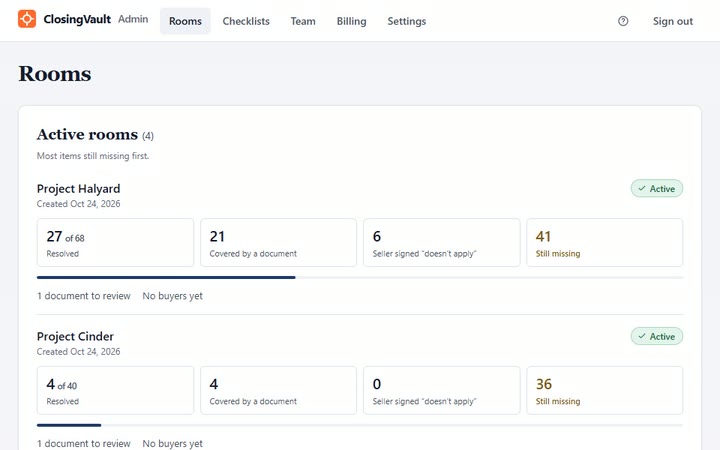
ClosingVault’s Rooms page shows every live deal room on one page, the one with the most still missing first: what’s resolved, what a document covers, what the seller says doesn’t apply and what’s still due, with each room’s documents to review and its buyers.
Last updated: 2026-11-03
What does the deal dashboard show?
For every live room: items resolved, items a document covers, items the seller signed don’t apply, and items still missing, with the documents waiting on review and the room’s buyers. Inside each room, the buyer pipeline shows every buyer’s stage from teaser to closing: who is exclusive and until when, and which LOI is waiting on you.
How does it work, step by step?
- Open the Rooms page. Every live room, most still missing first.
- Open a room. Its checklist status, filtered by missing, waiting on review, covered and not applicable.
- See the buyers. Stage, last active, documents opened, views and downloads, and how much of what each buyer can see they’ve opened, straight from the audit log. Facts, not scores.
- Get alerts. Turn on buyer-activity alerts to hear when a buyer opens or downloads something, as often as every 15 minutes or as rarely as once a day.
- Search the record. The activity log names every document and milestone in plain words, searchable by person, document, folder, action and date.
Why does it matter in a lower-middle-market deal?
Brokers and M&A advisors run several listings at once, each at a different stage. A screen that ranks them by what’s still missing tells you which seller to call first, and the buyer view tells you who is actually reading. Professional runs 10 active deal rooms with 15 admins; add a colleague as a room co-admin with the same room powers.
How is it different from other data rooms?
Other rooms list dashboards and tracking too. On the vendors’ own sites, checked 2026-11-03: SecureDocs lists dashboards, activity alerts and an audit trail; Ansarada lists centralised task management and workflow on Essentials; DocSend lists due diligence tracking on Advanced Data Rooms. What ClosingVault adds is the checklist count behind every room, because each document is filed to the item it answers.
Deal dashboard questions
I’m a broker with six listings. How do I see which deal needs me today?
Open the Rooms page: every live room is on one page, the one with the most still missing first, with its documents to review and its buyers.
Can I see which buyers are actually reading the CIM?
Yes. For each buyer you see stage, last active, documents opened, views and downloads, and how much of what they can see they’ve opened, straight from the audit log.
Will I be told when a buyer opens something?
Yes, if you turn on buyer-activity alerts: as often as every 15 minutes or as rarely as once a day.
How many live deals can I run at once?
1 active deal room on Starter, 3 on Plus and 10 on Professional. Archive a room when its deal ends to free its slot.
Can a colleague at my firm watch the same deals?
Yes. Add a colleague from your firm as a room co-admin with the same room powers; each takes one admin seat on your plan.
What does “resolved” mean on the dashboard?
An item is resolved when a document covers it or the seller has signed that it doesn’t apply. Everything else counts as still missing.