Feature: checklist filing
The due diligence checklist checks itself off.
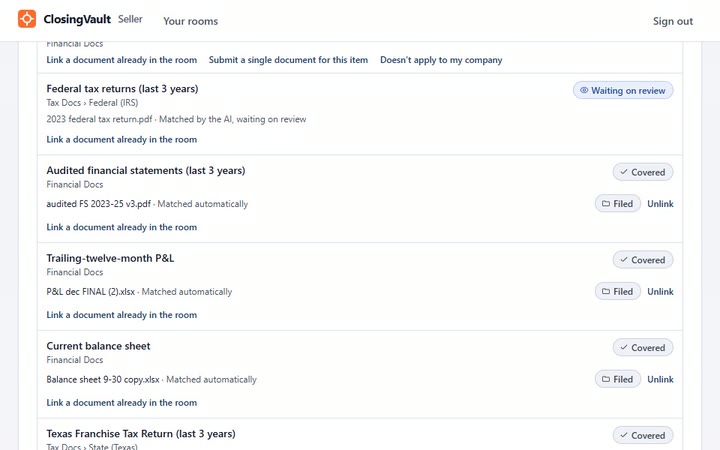
Each document ClosingVault files lands on the checklist item it answers and marks it Covered. The Missing count falls as documents arrive and nobody ticks a box. An item closes only with a document, or the seller’s signed word that it doesn’t apply.
Last updated: 2026-11-03
What does checklist filing do?
A full diligence request list runs to hundreds of lines. ClosingVault reads every file, scans included, files it under the checklist item it answers and ticks that item. What’s left on the list is what’s still missing, so you chase only the gaps.
How does it work, step by step?
- Start from a list. Every plan includes our standard due-diligence checklist, Plus and Professional include the ClosingVault checklist, and any room can start from your own Excel list.
- Set phases and dates. Split the checklist into phases, each with a start and a due date, and release each one to the seller today or on a date you set. Give any item a deadline and overdue items are flagged.
- Documents arrive. Each one is matched to the request it answers and the item is marked Covered.
- Unsure ones wait. When the AI isn’t sure, the file waits for review.
- Nothing closes on silence. An item closes only with a document or the seller’s signed statement that it doesn’t apply, with their name, the time and their exact words.
- Two ticks. Sections are marked Classified by the AI and Certified complete by the seller, with their name and the time.
Why does it matter in a lower-middle-market deal?
ClosingVault works as the broker’s automated due diligence project manager: it tracks every item on the request list and its deadline. When the list fills itself, the broker chases only what’s missing, the seller works from the same list, and the exclusivity period goes to closing, not to hunting for paperwork. If a buyer later says something was withheld, the record shows what was requested, what was provided and what the seller certified.
How is it different from other data rooms?
Of the seven low-cost rooms on our comparison, checked on their own sites on 2026-11-03, none states filing each document to the checklist item it answers. The closest is DocSend’s diligence tracker, on its Advanced Data Rooms plan: visitors complete a task by uploading or decline one that doesn’t apply, and an admin can also mark a task complete without either.
Start from our list: the free due diligence checklist is the standard checklist used in ClosingVault.
Checklist filing questions
I’m a buyer with a 300-line request list. How do I see what the seller still owes
me?
Your request list shows covered and missing at a glance, missing first. Each document the seller adds is filed against your list and ticks the item it answers.
My seller says a document never existed. How does that request close?
The seller signs a statement that it doesn’t apply, and that closes it. The statement stays on the record with the seller’s name, the time and their exact words.
I’m a broker. Can I hold back the legal requests until the financials are in?
Yes. Split the checklist into phases, each with a start and a due date, and release each one to the seller when you choose, today or on a date you set. Nothing reaches the seller until you do.
Does anyone have to tick the boxes by hand?
No. Each document lands on the checklist item it answers and marks it Covered, and the Missing count falls on its own. When the AI isn’t sure, the file waits for a person to review.
Can an optional item just be left blank?
No. Every item stays open until it is answered, with a document or the seller’s signed statement that it doesn’t apply, so nothing slips through as silence.
Which checklist does a new room start with?
Every plan includes our standard due-diligence checklist, and Plus and Professional include the ClosingVault checklist. You can also upload your own request list as an Excel workbook when you open the room.